
 By
By 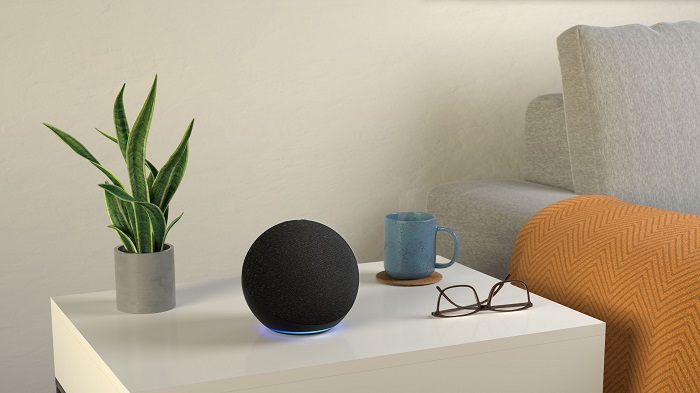
Smart speakers have established themselves as fixtures of modern domestic life. They set kitchen timers with hands-free ease, stream morning news briefings, manage home thermostats, and answer trivia questions across the living room. Yet that seamless utility rests on a trade-off that many homeowners accept without fully understanding: inviting an array of internet-connected, always-on far-field microphones into their most private spaces.
While ambient listening devices have been marketed as friendly, unobtrusive digital concierges, they are fundamentally data-gathering endpoints for massive commercial ecosystems. Every command you issue, every misunderstood phrase, and every accidental activation feeds into corporate servers. Fortunately, you do not have to unplug your devices and toss them into an electronics recycling bin to reclaim your peace of mind. Conducting a thorough privacy audit of your smart speaker allows you to keep the everyday conveniences you enjoy while severely limiting what the device hears, stores, and broadcasts.
How Smart Speakers Actually Listen
To audit your privacy effectively, you first have to separate technical reality from urban legend. A persistent myth claims that smart speakers record every conversation in your home and continuously stream terabytes of audio to the cloud. If that were happening, your home network bandwidth would crawl, and cybersecurity researchers would have exposed the data transfers years ago.
Instead, smart speakers rely on local, on-device memory buffers that cycle continuously through a few seconds of ambient noise. The device listens solely for a specific acoustic pattern: the wake word. Once the on-device processor detects that trigger phrase, the speaker wakes up, illuminates its status ring, and establishes an encrypted connection to cloud servers to process your verbal request.
The true privacy vulnerability lies in accidental activations. Household chatter, dialogue from television shows, or phonetically similar words routinely trip the wake-word detector. When that happens, the speaker transmits whatever was said in your home during those subsequent seconds directly to corporate servers. Without proper configuration, those errant recordings are archived indefinitely, tagged to your personal account, and potentially evaluated by human contractors to refine machine learning models.
Purging Your Audio History and Halting Future Storage
The first stop in your audit should be the voice recording archive. By default, smart speaker platforms are configured to retain your voice recordings indefinitely to train their voice-recognition algorithms. Leaving years of audio logs sitting on external servers creates an unnecessary digital paper trail that can be exposed in account compromises or subpoenaed in civil litigation.
Open the companion application on your smartphone, navigate to the settings menu, and locate the dedicated privacy dashboard. Within this section, select the voice history review tool. You will likely find an exhaustive catalog containing hundreds of sound bites spanning back to the day you set up your device.
To take control of this data, configure two key settings:
-
Automate Deletion Schedules: Rather than keeping recordings forever, select the auto-delete feature. You can instruct the system to retain recordings for three months, eighteen months, or choose the most secure setting: do not save recordings. Selecting the option not to store recordings ensures that audio snippets are processed in real time to satisfy your command and immediately discarded from company servers.
-
Enable Voice-Activated Deletion: Within the same menu, toggle on the permission to delete by voice. This allows you to issue spontaneous commands such as asking the speaker to delete what you just said or instructing it to wipe everything you said that day whenever you notice an unintentional wake-up.
Opting Out of Human Review and Algorithm Training
In recent years, investigative reporting revealed that technology companies employed teams of human annotators and contractors around the globe to listen to customer voice recordings, transcribing audio to check algorithmic accuracy. These workers occasionally overheard intimate medical conversations, private financial negotiations, and domestic arguments that had inadvertently triggered the wake-word sensor.
Companies subsequently introduced an explicit opt-out toggle, though it is often buried several layers deep within account settings.
Under the data management section of your privacy portal, locate the setting that governs how your data improves services. Toggle off the setting that authorizes the use of voice recordings to develop new features. Disabling this permission prevents human reviewers and internal engineering teams from accessing your audio snippets, ensuring your voice interactions remain isolated within automated processing pipelines.
Severing the Neighborhood Mesh Network
One of the most controversial smart home developments is the rollout of automated, low-bandwidth neighborhood mesh networks like Amazon Sidewalk. This technology is designed to help compatible devices—such as outdoor floodlight cameras, pet trackers, and smart lighting—stay connected beyond the physical reach of a home Wi-Fi network.
The mechanism behind this network works by pooling a tiny fraction of your internet bandwidth with that of your neighbors, turning your indoor smart speakers and smart displays into communal bridge devices. While the parent company insists that this protocol utilizes multiple layers of encryption and caps bandwidth consumption, the system was rolled out across millions of household devices via an automatic opt-in.
Many consumers object to having their privately funded internet connection and personal smart hardware drafted into an unregulated community network. To opt out, navigate to your account settings within the mobile application, locate the network-sharing or Sidewalk sub-menu, and toggle the feature to disabled. Your indoor speakers will continue functioning normally on your home Wi-Fi network without acting as a signal relay for nearby devices.
Restricting Third-Party Skill Permissions
Smart speakers derive much of their functionality from third-party mini-applications, commonly known as skills. Whether you use a skill to order takeout, play a soothing ambient soundscape, or consult a local transit schedule, these integrations represent an external data pipeline.
When you enable a skill, it frequently requests access to personal account parameters. Over time, users accumulate dozens of forgotten skills that retain perpetual access to sensitive data points.
Conduct a systematic sweep of your skill permissions:
-
Location Data: Determine which skills genuinely require your precise street address. A food delivery integration needs it; an ambient sleep sounds skill certainly does not.
-
Personal Identifiers: Review which external developers have access to your full name, email address, and mobile phone number. Revoke access across all services where that data is non-essential.
-
Prune Unused Integrations: If you have not used a particular skill in the last six months, disable it entirely. Removing dormant third-party integrations reduces your digital attack surface.
Locking Down Communications and In-Home Intercoms
Features designed for household convenience can turn into intrusive privacy vulnerabilities if left unrestricted. The internal calling and intercom functions—often branded as Drop In—allow users to instantly initiate an active two-way audio or video stream with other compatible speakers in the residence.
When configured carelessly, this feature allows permitted outside contacts to open an instant communication channel without the recipient manually answering the call. If an Echo Show sits on a bedside table or a kitchen counter, an unexpected Drop In activation can broadcast private household moments in real time.
Open your device settings, select communications, and review your intercom permissions. Restrict this capability strictly to My Household, or disable it entirely if you do not use your speakers as an intercom system. Furthermore, comb through your synchronized mobile contact list and verify that no external acquaintances or business contacts have been granted permission to drop in unannounced.
Physical Countermeasures for Complete Peace of Mind
Software configurations and account toggles are essential, but digital controls can reset during major firmware updates or service migrations. For sensitive conversations, hardware-level physical controls remain the ultimate safeguard.
Every reputable smart speaker includes a physical microphone mute button on the chassis. Pressing this button physically breaks the electrical circuit supplying power to the microphone array, illuminating a bright red indicator light. Unlike a software setting, a hardware disconnect cannot be bypassed by an erroneous voice trigger, an algorithmic glitch, or an over-the-air firmware update.
If you utilize smart displays equipped with integrated webcams, always take advantage of the mechanical camera shutter. Sliding a physical piece of plastic across the lens provides an absolute visual barrier that no software vulnerability can circumvent.
Finally, consider the physical placement of your speakers. Avoid placing active microphones in private home offices where you routinely discuss confidential client business, conduct legal calls, or review proprietary corporate finances. Keeping voice-activated hardware out of intimate spaces like bedrooms ensures that your smart home convenience never compromises your personal boundaries.










Comments